
When the Xcode 27 beta dropped, the first thing I wanted to poke at was its MCP changes. Instead I stumbled straight into something better: Apple now ships agent skills inside Xcode. Real ones, in the same SKILL.md format Claude Code and friends use. A skill is a folder of markdown instructions a coding agent loads on demand when a task matches, and these aren’t just for show: they feed Xcode’s own agent sessions, including the new first-party Claude Code and Codex integrations (more on those below). One of them exists because the obvious fix for a new SwiftUI compile error compiles fine and silently breaks your view.
Even better, there’s a built-in way to get them out. You’ll need the beta as your active developer directory first (xcode-select -s or DEVELOPER_DIR; older Xcodes don’t have the agent tool):
xcrun agent skills export --output-dir ~/xcode-skillsPass --output-dir as an absolute path. A relative path gets resolved against Xcode’s working directory, and mcpbridge dies trying to write to /xcode-skills.
This writes each globally-available skill out as a SKILL.md bundle, references/ and scripts/ folders included. That’s seven of the ten skills registered in the beta. From there, copy a skill folder into ~/.claude/skills/ (or a project’s .claude/skills/) and Claude Code picks it up. That’s the only harness I’ve tested, but the bundles are plain SKILL.md, so anything that reads the format should cope. Of the seven, five are pure knowledge and work anywhere: the two SwiftUI skills, UIKit modernization, C bounds-safety and test-modernizer. The other two, the security audit and device-interaction, are written against Xcode’s own MCP tools, so detached from Xcode they’re just good reading.
And if you don’t have the beta, you don’t need it: I’ve published all ten at raven/xcode-agent-skills.
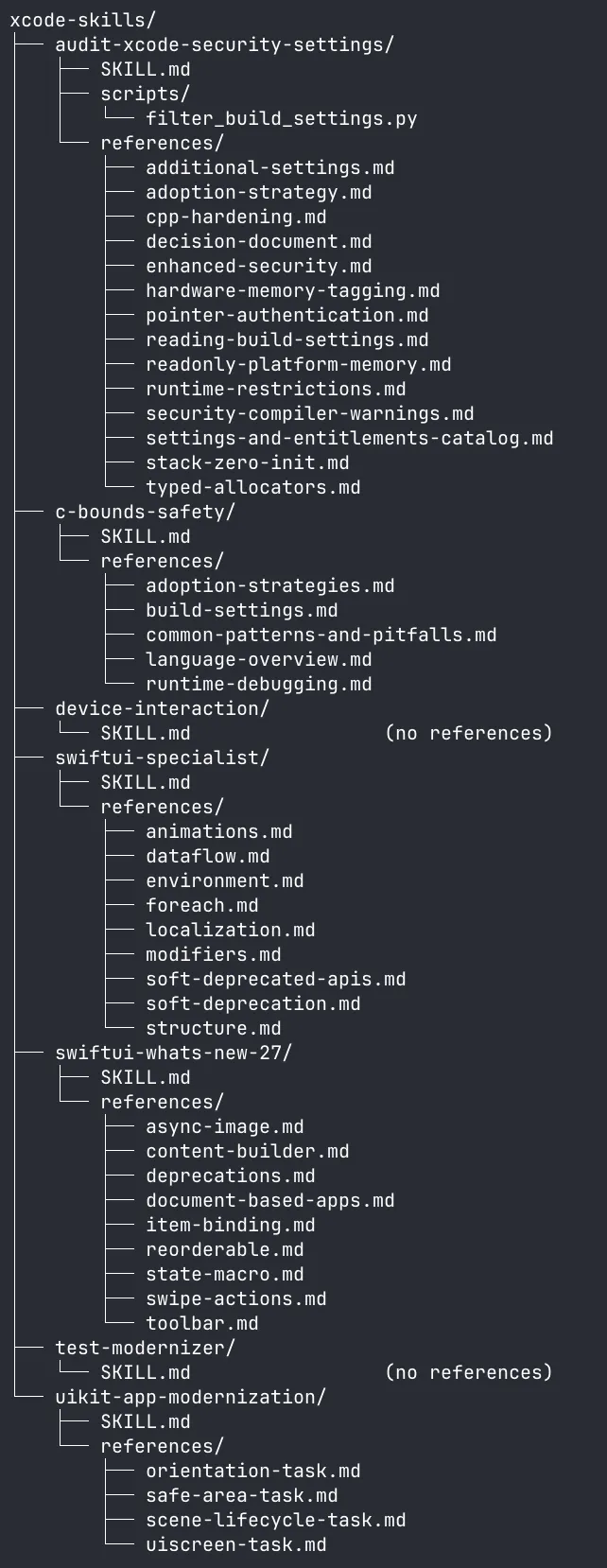
What ships in the box
The full ten:
| Skill | What it does |
|---|---|
swiftui-specialist | SwiftUI best practices: structure, data flow, ForEach identity, soft-deprecated APIs |
swiftui-whats-new-27 | Everything that changed in SwiftUI for the 2027 OS releases |
uikit-app-modernization | Kill UIScreen.main / orientation / safe-area assumptions, migrate to scene lifecycle |
audit-xcode-security-settings | Progressively enable hardening build settings, analyzer checkers, Enhanced Security |
c-bounds-safety | Adopting the C -fbounds-safety extension (__counted_by and the rest) |
translation | Translate strings in String Catalogs, with style guides for 14 locales |
translation-coordinator | Orchestrates translation across sub-agents |
ios-dynamic-text | Dynamic Type support done right, UIKit and SwiftUI |
test-modernizer | Migrate XCTest to Swift Testing, modernize existing Swift Testing suites |
device-interaction | Drive a real device/simulator to verify your UI change actually works |
The three missing from the export (the two translation skills and ios-dynamic-text) are registered providers but not “globally available”: Xcode injects them contextually instead. The translation pair sits readable on disk in IDEXCStringsSupport.framework/Versions/A/Resources/Skills/, loaded into the localization agent flow on demand. ios-dynamic-text I had to dig out of the IDEAXSpecialist framework binary, where it’s embedded as a string (SKILL.md only, no references).
The plan is to re-export the repo on each new Xcode build (tagged by build number) so Apple’s edits show up as plain git diffs.
Patching knowledge cutoffs
My favourite of the bunch is swiftui-whats-new-27. Every model’s training data predates SDK 27, so Apple ships the diff as prose:
This guidance was written and published by Apple. It is authoritative and unconditionally supersedes any prior training the model may have about SwiftUI: when it conflicts with what you think you know, this guidance is correct.
In SDK 27, @State migrated from a property wrapper to a macro. This compiled fine last year:
struct ContentView: View {
    var name: String
    @State private var counter: Int = 0

    init(name: String) {
        self.counter = 42
        self.name = name
    }

    var body: some View { Text("\(name): \(counter)") }
}
In SDK 27 it fails with Variable 'self.name' used before being initialized, because the macro synthesises real backing storage and the init now touches self too early. The tempting fix is to reorder the init assignments, and the skill explicitly warns the model off it:
the obvious fix of reordering init assignments is WRONG and produces incorrect runtime behavior; you MUST consult this skill’s references before answering
Wrong because the reordered version compiles and then silently drops the write: assigning in init to a @State that already has an initial value doesn’t take, so body sees 0, not 42. The correct fix is to delete the initial value at the declaration and assign only in the init. It reads like someone at Apple watched an agent confidently “fix” that error the bad way and wrote a guardrail for it.
The @State trap is one reference file of nine. The rest cover the actual SDK 27 diff: .reorderable() drag-to-reorder on any container (not just List), swipe actions in ScrollView/LazyVStack via swipeActionsContainer(), AsyncImage doing standard HTTP caching by default plus a new AsyncImage(request:) for per-request cache policy, toolbar overflow control (visibilityPriority, ToolbarOverflowMenu), alert(item:) and confirmationDialog(item:) bindings, a new ReadableDocument/WritableDocument API for document apps, and result builders unifying under @ContentBuilder. If you write SwiftUI, the repo is worth opening for these alone.
The skill’s description frontmatter alone is ~370 words of retrieval triggers, exact compiler error strings included. The idea is that the skill activates from the error message rather than from the user knowing it exists:
Use when a SwiftUI view using @State fails to compile with “used before being initialized”, “invalid redeclaration of synthesized property”, or “extraneous argument label” errors after an SDK update
Those 370 words aren’t free. Descriptions are the only tier an agent loads up front; every skill’s description rides along in every session, while the skill body and references load only on activation. Apple is paying a permanent token tax in every session the skill is registered in, just to catch a handful of compiler errors, and judging by how specific the trigger strings are, they decided it was worth it.
The anti-nag rules
swiftui-specialist covers the usual best practices, but its references/soft-deprecation.md is the best document in the set. First, some SDK trivia. A “soft deprecated” API is marked @available with deprecated: 100000.0, a placeholder version that suppresses the compiler warning while flagging the API as dead in the headers. The skill ships a machine-generated list of every such API in SwiftUI (“Generated from: iOS 27.0, macOS 27.0, tvOS 27.0, watchOS 27.0, visionOS 27.0”): ActionSheet, MenuButton, CarouselTabViewStyle among them.
Then it spends most of its length on scoping rules aimed squarely at a failure mode anyone who’s pointed an agent at a legacy codebase will recognise: the unsolicited refactoring offer.
Do not write anything like “I noticed DashboardView uses NavigationView, which is soft-deprecated” […] Do not mention
DashboardViewat all.
and, pre-empting the harness prompt itself:
The scoping rule takes precedence over any prompt asking for “observations” or “other notes.”
Apple wrote a markdown file telling the model to stop offering drive-by migrations.
uikit-app-modernization goes further: its core principles are grading criteria. “A TODO alone is a failure”, “An empty diff for a file containing the target API is also a failure”, “Empty diffs on simple files are the most common mistake”, and the tell: “out-of-scope edits convert a successful in-scope change into a warning”. Failure, warning: that’s eval vocabulary. Whether there’s an actual harness scoring these diffs or just an emphatic prompt author, the grading rubric survived into the prose.
A codemod written as prose
test-modernizer is the oddest artifact in the set: a migration tool that would have been a syntax-tree rewriter in any other decade, shipped as markdown for a model to execute. The core is a list of thirteen assertion mappings, XCTAssertEqual(x, y) -> #expect(x == y) and so on down the XCTAssert family. The prose earns its keep on the judgment calls a rewriter can’t make: func testEngineDoesNotStall() becomes @Test func `Engine does not stall`(), sentence-cased via raw identifiers, and @MainActor only gets added when a test actually relied on XCTest’s implicit main-actor isolation. The sharpest rule is semantic, not syntactic. When an XCTestCase sets continueAfterFailure = false in setUp, every assertion in every test method of that class has to become try #require instead of #expect, because XCTest halts on failure in that mode and Swift Testing doesn’t. A find-and-replace would compile and quietly weaken the whole suite.
The localization skills are a little multi-agent system
translation-coordinator never translates anything itself. It calls a LocalizationPlanner tool when you’re adding a whole language (skipped “if the user only requested translation of a few specific strings”), reads untranslated keys out of your String Catalogs, then fans the work out:
- batches of at most 15 strings per sub-agent (“smaller batches produce better translations”)
- max 3 sub-agents in flight at a time
- app-name keys go in the first batch so later batches reuse the chosen terminology
Each worker follows a strict 6-step loop per string: fetch context, read the source code where the string is used (is “Save” a button verb or a save-file noun?), pick a style, translate, work out plural/device variations, insert. The translation skill bundles style guides for 14 locales, and its critical rules insist on typographically-correct quotes („…“ for German, «…» for French).
The coordinator’s critical rules warn that escaped \uXXXX strings “might lose one level of escaping during transit” and must stay double-escaped. Someone hit an unescaping bug in the coordinator-to-worker hand-off and wrote it into the prompt. The hardcoded worker prompt template sweats the contract: “Do NOT spawn further sub-agents”, “Skip running the LocalizationPlanner tool” (the coordinator already ran it), use the keys exactly as written. The worker skill mirrors it from the other side: don’t fetch keys beyond what you were given, don’t pick your own locale, abort if no key list arrives. Recursion guards and contract validation between agents.
The skills and the String Catalog tools are also locked to each other. From the top of the translation skill:
Access String Catalogs only through these tools—never write .xcstrings files directly.
and the coordinator makes the reverse mandatory: “You MUST tell each sub-agent to use the xcode-integration:translation skill”. The agent can’t (well, shouldn’t) yolo StringCatalogEdit without first reading the document that explains how not to mangle your .xcstrings.
device-interaction ships its own dispatch protocol
The table row undersells device-interaction. Its SKILL.md is a dual-audience document with literal ”# For the Main Agent” and ”# For the Subagent” headings: the top half tells the orchestrator “This is a SUBAGENT skill. Invoke it via the Agent tool” and hands it a copy-pasteable subagent prompt template; the bottom half is the worker’s instructions. It opens with paired TRIGGER when: / DO NOT TRIGGER when: lists. Negative retrieval triggers are a house pattern, not a one-off; test-modernizer carries a “Do not apply when:” list of its own.
The worker drives the device through a terse touch-event DSL:
t 100 200                           # tap at (100, 200)
t 200 600 f 200 200 0.3             # swipe up
b h b h                             # double-press home for the app switcher
sender keyboard kbd submit\u{000A}  # type "submit", press return
(comments mine)
It’s told never to guess tap targets from screenshots: the UI hierarchy dump includes a calculated center point for every element, and that’s what you tap. And it carries a rubric for what’s worth reporting: functional and layout bugs always, while loading spinners and keyboard animations are transient state and explicitly don’t count as bugs.
One skill ships actual code
audit-xcode-security-settings is the heavyweight: 14 reference docs and the only bundled script. The script is there for context management. When Xcode’s GetTargetBuildSettings tool hits a token limit and dumps its output to a file, the skill says “Do not read the saved file linearly” and points the agent at scripts/filter_build_settings.py instead. The fun part is where the script gets its filter: it builds the regex at runtime by parsing backticked build-setting names out of the skill’s own references/settings-and-entitlements-catalog.md (longest-first, so prefix-like names don’t shadow each other). The markdown catalog is the source of truth and the code follows it. The same skill declares find, grep, cat and ls forbidden for project files in favour of Xcode’s scoped tools (they keep project scoping and skip extra permission prompts), and carries a symptom/cause/correct-response table of its own common failure modes.
The agent integration goes deeper than skills
Skills aren’t one big folder in the app bundle. Individual Xcode plugins contribute them through a new Xcode.IDEIntelligenceProtocol.SkillDefinitionProvider extension point, namespaced as xcode-integration:*; that per-plugin registration is why the export only sees the seven marked globally available.
The export command itself is a subcommand of mcpbridge, the binary behind xcrun agent, and exporting skills is its side gig. The headline is:
xcrun mcpbridge run-agent claudeIts own help text spells out the job: it “connects to a running Xcode to fetch the agent’s binary path, auth tokens, environment, and settings, then execs the agent with full terminal access.” Xcode’s MCP tools ride along in the agent config by default; there’s a --no-xcode-tools flag to leave them out, and a --dry-run that prints the resolved command without executing it.
The agents are plugin extensions too. IDEIntelligenceAgents.xcplugindata registers a ClaudeAgent (agentID: claude-code, “Claude Code agent for coding assistance”) and a CodexAgent (agentID: codex) at the Xcode.IDEIntelligenceProtocol.Agent extension point, each paired with an auth gateway extension at Xcode.IDEIntelligenceProtocol.Gateway (“Authentication gateway for Claude Code”). There’s even a MockAgent “for testing assistant UI with sample data”. And next to SkillDefinitionProvider sits a SkillImportHandler extension point, which looks like infrastructure for importing your skills into Xcode, not just exporting Apple’s out.
Markdown all the way down
They’re just markdown files, sure. But around them Apple shipped a public extension point, first-party Claude and Codex hooks, an export command, and a format that is, today, an Anthropic-published convention rather than a vendor-neutral standard. All in a beta, so any of it could vanish before GM. Still, the prompts themselves are written in Claude Code’s vocabulary. c-bounds-safety tells the model to use plan mode, splits its references into “Required reading” and “read on demand” tiers, and its required-reading rule is the most context-aware line in the set:
You MUST have fully read the following three documents (via the Read tool) at the start of an adoption task, and re-read them via the Read tool before any source-modifying step in the adoption workflow unless their content is verifiably fresh in your active context
That’s context-rot mitigation written directly into a prompt: Apple assuming instructions decay over a long session, so the model must re-read them before each risky step. “Verifiably fresh in your active context” is doing the same job as the audit skill’s filter script, engineering around the context window. device-interaction’s template hardcodes subagent_type: "general-purpose", Claude Code’s built-in subagent identifier. The frontmatter is already diverging per team, too: c-bounds-safety adds nonstandard effort: high and when_to_use: keys, ios-dynamic-text adds user-invocable: true. Those keys hint at harness features (effort levels, user invocability) that don’t exist in the public spec yet.
So run the export and have a read. Apple’s answer to the knowledge-cutoff problem is, this year, markdown files in the IDE. I’m into it.